Help
Frequently Asked Questions
This section answers your pressing questions such as "What kind of photos do you want?" and "How can I submit a rally report?" They begin with the most obvious question. I don't mind if you ask a question that is already answered here. It shows my first answer isn't very clear. I am prepared to go into detail so long as you are not offended if I teach you how to suck eggs!
Q How do I ask a question?
A Use the Contact Centre
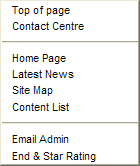
There are lots of ways. Starting with the easiest: Anywhere on any LPMCC.net page right click and the context menu will pop up. This contains a few shortcuts to useful things. Near the top is "Contact Centre". If you click on that option a comment form will slide out from the left edge. Write your question in the Notes tab and click "Send". If you want an answer sending back to you, include your email address.
You get exactly the same Contact Centre if you click the [Contact] option at the bottom of every page.
There are other ways to ask. If you ask me in person at a meeting I may try to tell you there and then with arm waving and assertions that "... it is sooo easy!" Tell me to calm down and email the answer to you later! Or you could send me an email to ben @ honsec.co.uk (remove spaces) asking the question. I will try to reply within 48hrs or as soon as I sober up.
Q Can you make the text size bigger?
A Use browser View > Zoom.
You can do this easily with any of the latest browsers and a wheel mouse. Hold down the Ctrl key and roll the mouse wheel with the index finger of your other hand.
Alternatively try the browser menus such as View > Zoom.
That should make all items including the menu buttons easier to read and usually enlarges the pictures as well. LPMCC.net is constructed to work well in a small screen so it can be enlarged quite a bit on a modern monitor.
The latest browsers, such as Firefox and Google Chrome, 'remember' what zoom you use on LPMCC.net so the next time you open a page it appears in your chosen magnification.
Q How do I send a scanned picture or file from a digital camera?
A Email it as file attachment.
Good question. I'll go through this in some detail so get a beer from the cooler.
Your scanner should allow you to alter the dpi settings, maybe under Advanced Settings. If your photo is 3" x 4" (75mm x 100mm) scan at about 300dpi. For a 6" x 8" (15cm x 20cm) photo scan at about 150dpi.
Save the resulting file using the "Save As" option from the file menu. If the scanned file has a name ending in .BMP see if you have an option to save as a .JPG file. See the "Save as type" option in the illustration. You may then have an "option" to save a JPG file with high, medium or low compression OR as high, medium or low quality. Choose LOW compression or HIGH quality. If the choice is a percentage, choose between 5% and 15%.
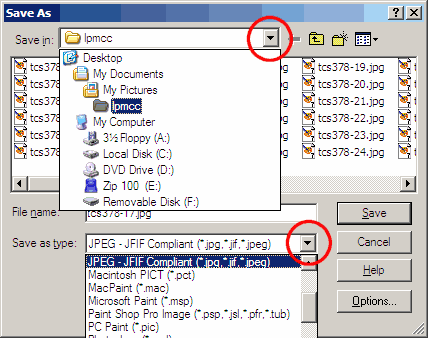
Remember where you save the file to. Usually it goes into My Pictures in My Documents but your scanner may try to put it in a folder among the scanner's program files. If you are not sure what the path is, click the drop down button next to the "Save in" box and take a look. Computers being as friendly as they are you may need to write it all down on a scrap of paper!
You can close your scanner application now.
Important: From your digital camera. Don't resave over your original photo files!
Windows Explorer.
Open Windows Explorer and delve down to the file you just saved.
It is preferable to now open your email client (program such as Outlook Express) to attach and send your pictures.
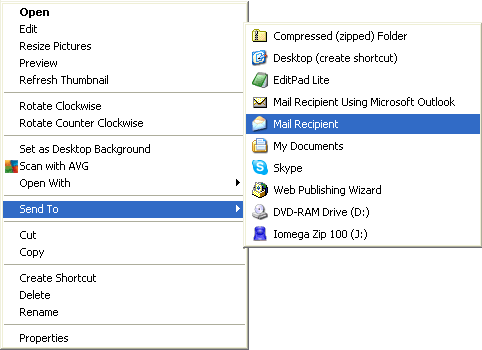
It is also possible to right click the file you want to send and Send To > Mail Recipient.
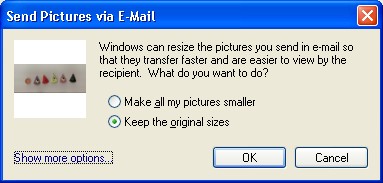
You should see this prompt. Click the lower radio button or else your photo will be shrunk before sending and will be useless for LPMCC.net
You may find other email clients or the scanner will ask if you want it suitable for emailing. No, you bleddy don't!
Outlook Express.
Start an email to me at ben @ honsec.co.uk (remove spaces). Drag and drop the file from Windows Explorer into the email text area. Add a sensible title and any story that goes with the picture, then send it to me!
Webmail.
If you use a webmail system such as MSN or Hotmail then do not send the photo straight from your scanner to email. Add it as a file attachment from the place where you saved it.
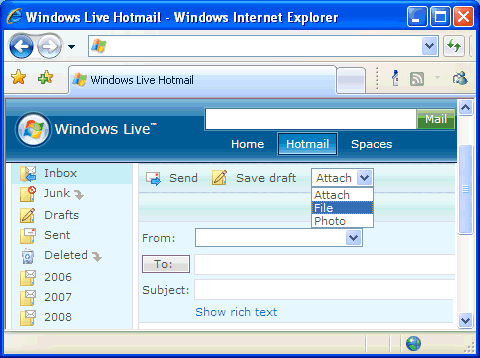

Additional notes:
Don't bother putting JPG files into a ZIP (compressed) file. It will not be any smaller than the original. However it is an option if you need to send a BMP file.
Drop me an email the day before to warn me they are coming through.
If you are on dial-up just send one photo at a time.
You should get a confirmation from me that they have arrived safely within 24 hours, give or take a fortnight.
If you have a large number of big photo files you may find it more efficient to write them to a CD and send it by post or pass it to me by hand. Or contact me to arrange transfer using flash memory.
Q What kind of reports do you want?
A Original material in your own words.
It only needs to be one or two paragraphs jotted down when a memory is stirred by something. If the muse takes you we love long stories that take up a whole page or more. The older the better but news and updates also greatly appreciated.
Subjects...
- Rally reports for addition to existing pages or for rallies we don't yet have details about.
- Motorcycles you loved or hated for the Motorbike section. Pay tribute to your favourite bike or heap opprobrium on that old dog.
- If you know one of our old members you can turn Queens Evidence and tell us all about the rascal.
- Heroic rides, dropping it, getting busted by the plod, dimly remembered pubs are all grist to our mill.
- Anything loosely associated with the general character of this website. It might start a new section.
- Last but by no means least we want your jokes for the famous Foz Spot.
Include...
- The names of clubs and the friends you shared those happy times with.
- Approximate year, place and what bike you campaigned.
- Scans of creased and faded photos, patches and badges.
- Update of what you are doing these days.
- We can also use video and sound files. Surprise me with summat unexpected.
Don't worry about the typos and smellings pistakes. If your text doesn't have them I'll put some in. I will keep your style of expression if it is not all blue. Our lawyers may want any bits removing that attract the libel vultures.
I don't care if you totally disregard this advice so long as you send summat.
Q What sort of file does a report need to be in?
A Plain text is best
It can be in a .TXT document or in the body of an email. If you use a word processor of some kind then please either save it as a plain text file (.TXT) or in Rich Text Format (.RTF).
I may not be able to open some types of files such as Works, Word Perfect and Publisher.
I also prefer the pictures to be sent individually rather than contained in a document.
At the end of the day, send me the report and let me sort it out; I'd sooner get the report.
Q I have managed to identify over 100 badges that I thought I'd lost and they are in My Badges on the site. Is there any way I could do a screen/pic grab onto my PC to add them to my albums?
A Find our hidden button.
To get a screen grab - arrange the view of the badges as well as you can then hold down your Alt key (bottom right next to the space bar) then press the Print Screen button (top right near scroll lock and Pause/Break) That will copy the window into your clipboard. From there open a graphics program such as Paint and paste the image in - usually a clipboard-like icon or menu choice Edit > Paste (or for really quick work in almost any Windows application, Ctrl V keys). If you don't have a graphics program you can paste a picture onto a Word page.
To have the badges arranged wider try the T-shirt link. This will open a new window with your badges arranged in groups of 30 in landscape format. It is intended for making a T-shirt so the badges overlap. Instructions are on the page.
If you have any problems with that here is an alternative. Open My Badges page containing your collected badges. Use your mouse to move the "spark plug" pointer slowly over My Badges title from left to right until it turns to a hand. It isn't making a rude sign to you. You have found a hidden button! Now press your (left) mouse button and the all-singing-all-dancing Contact Centre slides out with a list of the badge files.
Copy the list (click your pointer in the text box to get focus, press Ctrl A then Ctrl C) and paste it into the text area on Notes tab of Contact Centre (Ctrl V - remember?), add your name and press SEND. I'll zip up the badges and send them to you. They are transparent GIF images.
The secret list is there in case you need to transfer your collection to another computer. Your list is saved on your computer not my server so it will not be available on another computer unless you transfer the list. ie Copy off one computer and Paste into the other!
Q How can I get a copy of photos? I was at a rally a long time ago and myself and my mate are in a few of them.
A Click it and use Control Centre.
We have been naughty and disabled your usual right click menu that lets you copy images. Tell us which photos you want and we'll send you the original photo or scan. It is much better than the ones on LPMCC.net and also much BIGGER!
Sometimes you can just count down from the page top and tell us which number photo you want.
Because some pages show random photos that slide across we've introduced a simpler way to identify the photos you want us to send you. Double click the photo you want and the Contact Centre opens with the photo file name ready to send to us. Add your email address and press send.
If the photo is in a thumbnail set, click it to show it as a bigger picture then scroll all the way to the bottom of the page. There is a button under the Star Rating. Click it to open the Contact Centre with the photo identified ready to send. (The button is only there while a big picture is showing)
Photos of National Road Rally riders passing through Kegworth have an explanation and link in the page text.
By the way: Pictures you select this way will stay in your Notes until you clear them. So you can select several photos on different pages and later dates.
Are you getting the picture?
Q How can I take a screen shot so I can let you know where your page is falling apart?
A Keys Alt + PrtScrn.
On most versions of windows just press the PrntScrn key. That copies the whole screen to your clipboard. Then open Paint or other photo editing software and paste the picture (Ctrl+V) Save the picture as a .jpg or .bmp file or whatever.
To just grab a single window (such as Internet Explorer page) hold down Alt when tapping PrntScrn.
On Windows 10 you can hold down the Windows key and tap PrntScrn and that will save the picture as
Pictures/Screenshots/screenshot.png
Here is the layout showing key locations on a US/UK laptop.
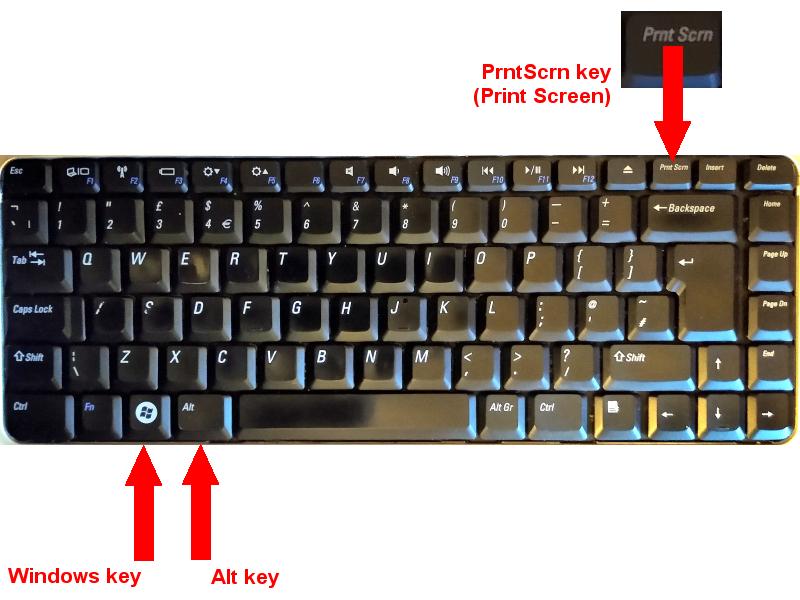
Windows 10 also has a handy set of utilities if you hold down the Windows key and press G - look for "Capture"
Q Do I need to be a past member to take part?
A You are an honorary past member.
We accept participation from past members, present members, members of similar clubs now and in the past and in the future, other motorcyclists, families and friends, fans and supporters, male and female, big and small. If that doesn't include you then lie about it.
Q2 Can anyone ask a question?
A2 Yes but ... can I answer it?
Q How do I suck eggs?
A First catch your eggs.
Make sure they are fresh because you suck them raw and any Salmonella will be sucked with it.
Use a sharp pointed instrument such as a pin to make a small hole at the 'pointed' end of the egg and another small hole at the opposite end. The holes need to go through the inner membrane as well as the shell.
Tilt your head back, hold the egg to your lips and suck hard on one hole with your cheeks. The egg will slip into your mouth.
Now swallow.